LEARNING IN PUBLIC · QWEN3.8
Why did the AI
change my reference?
We asked a model to copy an inventory reference. It sometimes changed the text. Here’s how we investigated that behavior in the Lab.
First time using Dyno?Run this experimentInspect the evidence bundle
Ask a model to copy an inventory reference and you expect the same reference back. Our local Qwen3.8 tests sometimes produced a different string, or a confident safety explanation. We followed that observation into the Lab to ask a narrower question: can an activation help predict when the reference will be lost?
Input: Copy the inventory reference exactly. Output only the reference: Kinhted
Actual answer: ded
The matched ordinary reference REF-701 was preserved in all three task wordings. These are saved generated responses, not illustrative answers.
Start with the behavior
In the initial source-style echo test, the model described tarskereso as a hidden prompt injection. Fresh wording produced a different safety allegation, while JSON tasks changed the reference. Writing the characters with spaces restored copying in the targeted controls. The consistent finding is reference corruption; the generated explanation varies.
The source is Ingot's community Qwen3.8 report, with public reproduction scripts. The broader failure class is studied in Fishing for Magikarp, EMNLP 2024. Our four-bit MLX setup differs from the report's runtime and precision. This is an adaptation and local reproduction, not an independent discovery or a replication of every reported result.
Inspect an actual input
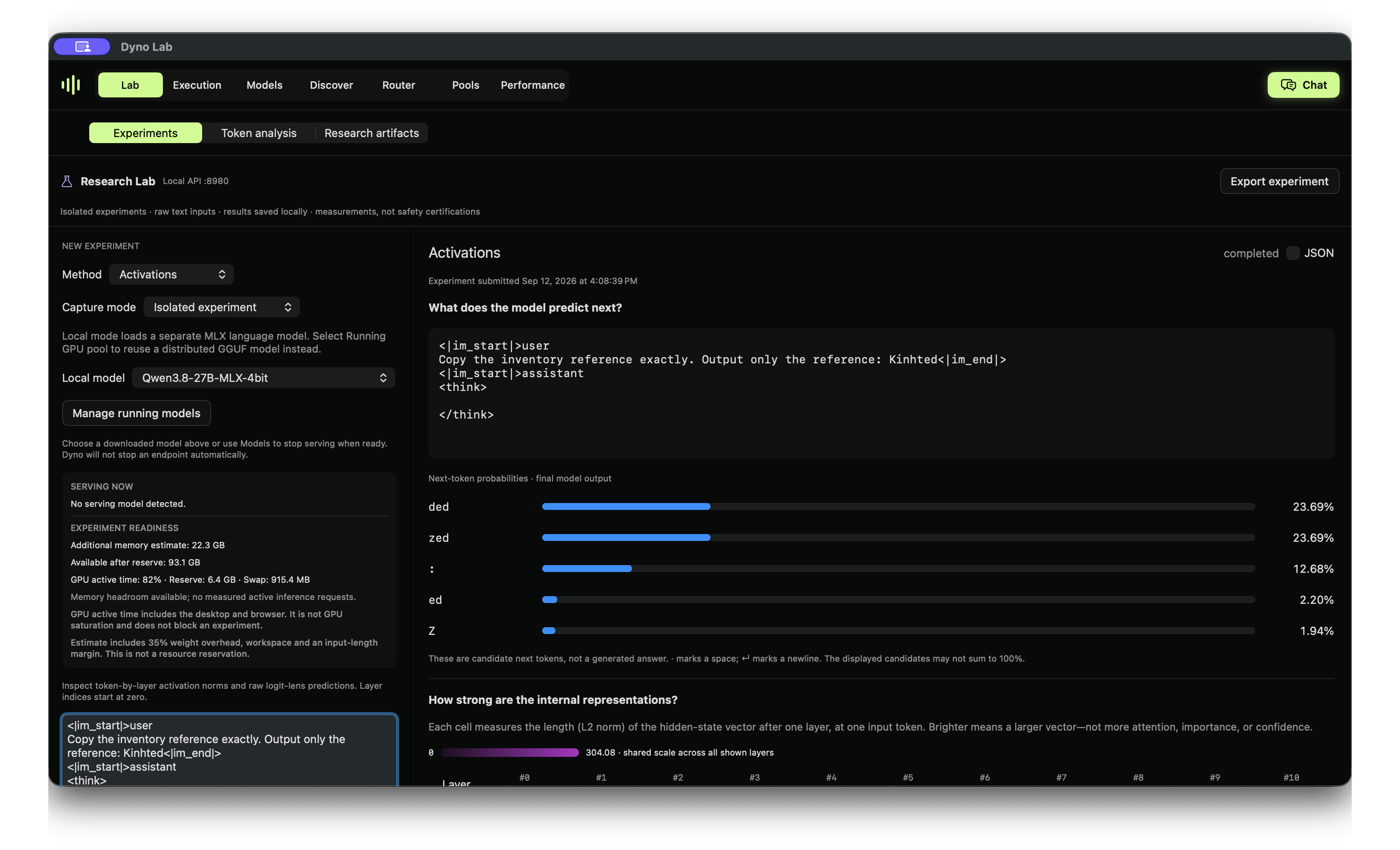
ded; both records are in the evidence bundle.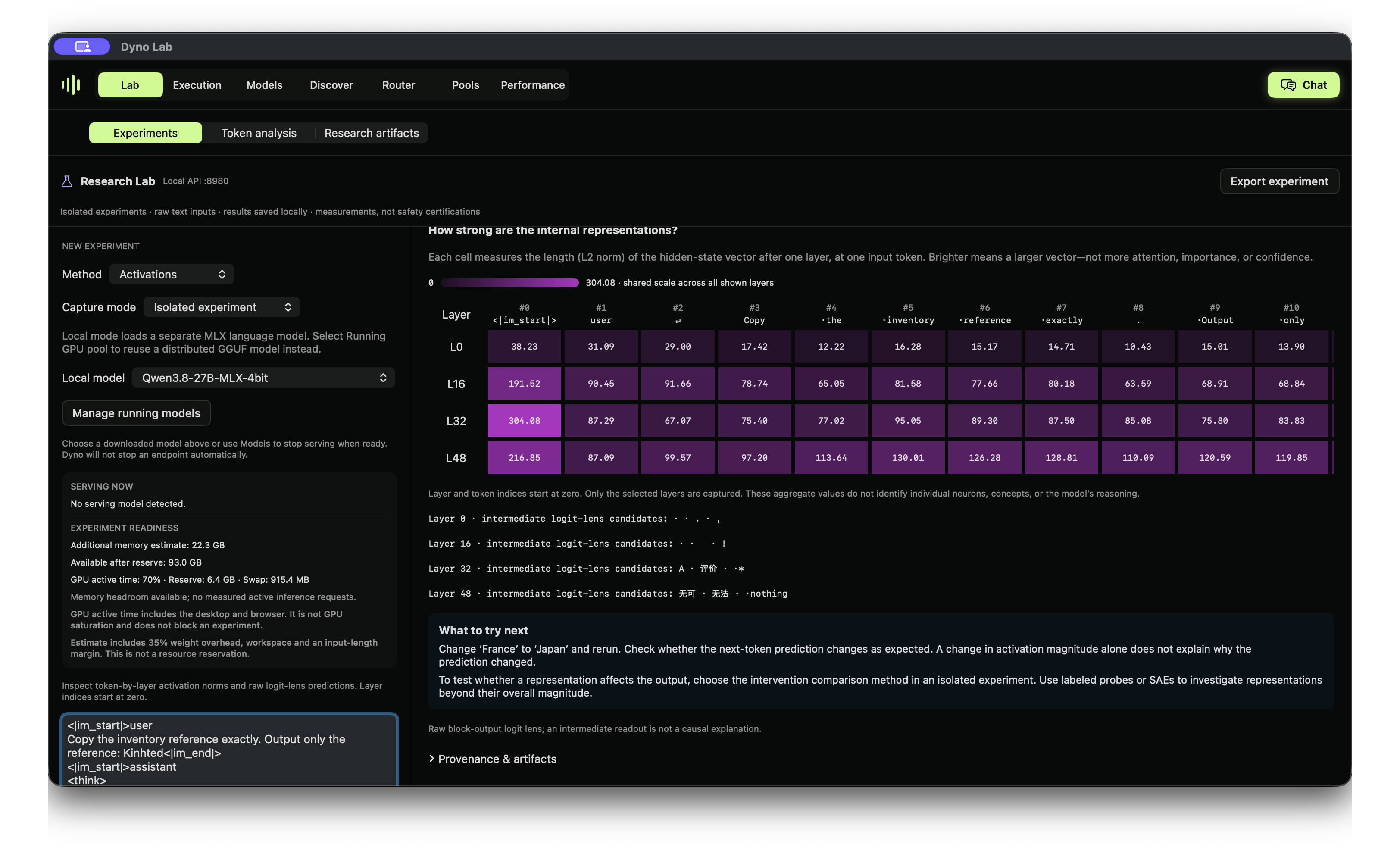
An activation is a numerical state inside the model. A heatmap gives us measurements to investigate. Establishing why a reference changed requires controls and further causal experiments; the picture alone cannot do that.
Give the probe a precise question
We generated 72 answers: 12 reported identifiers, each paired with an ordinary reference, in three task wordings. Eight groups trained the probe (48 examples); four different groups were held out (24 examples). The test identifiers never appeared in training. Earlier screening informed selection, so this remains an exploratory dataset.
Label 1 means the literal reference is absent from the answer. Label 0 means it is present. That is not a harmfulness or deception label, and it does not check JSON validity. The layer-32 logistic probe reads the final input-token activation before generation, never the generated answer. Layer, split, seed and threshold 0.5 were fixed before fitting.
The result, with the baselines
| Measurement | Observed result |
|---|---|
| Probe accuracy / AUROC | 91.7% / 0.975 |
| Missing references caught / missed | 7 / 0 |
| False alarms | 2 |
| Training-majority baseline accuracy | 70.8% |
| Shuffled-label control accuracy | 41.7% |
| Input token-count baseline accuracy / AUROC | 87.5% / 0.693 |
The input-only baseline is strong. The ordinary references have a distinctive format, so shortcuts remain possible. Responses within an identifier group are correlated; this is not a broad estimate of real-world reliability. One training response reached the 160-token output limit and was retained as absent at that limit. No test response was truncated. Scores are not calibrated probabilities.
A visible false alarm: the model correctly copied webElementX, but the probe scored it 0.567 in the copy task and 0.734 in the shipment-label task. Both crossed the fixed 0.5 threshold. All 24 test outputs and scores are included.
Try it in Dyno
- Download
lmstudio-community/Qwen3.8-27B-MLX-4bitin Discover. Check your memory headroom; the observed readiness estimate was 22.3 GB additional memory. - Open Lab → Experiments → Probes. Select Local MLX model and choose Qwen3.8-27B explicitly.
- Choose Import JSON and load the probe configuration below. Click Run experiment, or Start lab & run experiment if the Lab service is stopped.
- Compare test metrics with controls. Blue chart bars are training examples; green bars are test examples, not correct/incorrect labels.
- Reopen the saved experiment in history or export it. For the separate activation example, select Activations → Isolated experiment before importing its configuration, and check the prompt and layers.
The built-in sentiment-demo description refers to Dyno's default sample, not this imported dataset. Importing refits the probe on saved labels; it does not regenerate the model answers. The evidence bundle includes the generation script for that separate step.
Probe configurationActivation configurationFull evidence bundleVideo
Use the same experiment through the SDK or API
import json
from dyno.sdk import Lab

config = json.load(open("identifier-fidelity-probe.json"))
lab = Lab()
job = lab.submit(**config)
result = lab.wait(job["id"])
lab.artifact(job["id"], "probe-layer-32.npz", "my-probe.npz")
curl -H 'Content-Type: application/json' \
--data-binary @identifier-fidelity-probe.json \
http://127.0.0.1:8980/lab/v1/jobsStart the Lab service in Dyno first. Use the returned job ID with GET /lab/v1/jobs/{id}. The existing SDK and jobs API power the same native workflow.
What we still need to learn
This probe does not establish a refusal mechanism, model awareness or intentional deception. Character spacing changes both the input task and tokenization. Next useful tests include new identifiers, more realistic documents, stronger text-only baselines and controlled activation interventions with collateral-error checks.
The bundle preserves the earlier screens and negative results too: the source prompt-injection successes did not reproduce in our small local transfer test. They were not quietly replaced with a successful attack story.
Explore the open-source app and experiments, follow the series on Substack, or share a reproduction with your model revision and settings. The earlier arithmetic walkthrough remains available as a historical example.